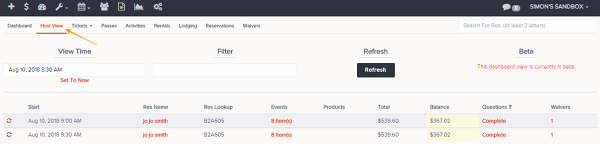
Navigation: Dashboard>>Host View
Below is a description of the information and functionality available on the Host View dashboard
Important Note: The host view is currently a Beta Feature and is only view-able
- Go to the Dashboard and click on the Host View tab
- Select date and time you would like to view events for
- These are the fields that are available
- Start
- Reservation Name
- Reservation Lookup
- Events (Expandable to show list of items)
- Products
- Total
- Balance
- Questions (Complete means all required questions are answered, incomplete means that required questions still need to be answer.)
- Waivers (Expandable to show a list of attached waivers as well as search and add new waivers function)
- This functionality is available on this page
- Set To Now (Sets the date and time to current date and time)
- Filter (Allows of filtering of dashboard list on keywords)